Choosing a website template looks easy until you realize how much depends on that decision. A good template speeds up launch, improves confidence, and supports business goals. A weak one creates rework, confusion, and design inconsistency.
This guide shows you how to choose a template strategically instead of emotionally.
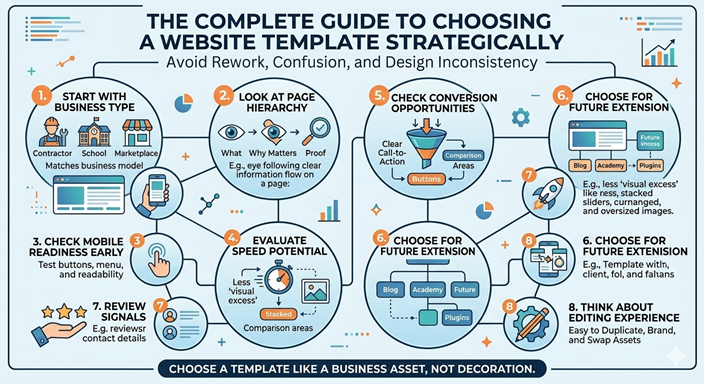
Start with the Business Type, Not the Visual Style
Many people choose templates by color, animation, or first impression alone. That often leads to frustration later.
The better approach is to start with the business model. Ask what the website actually needs to accomplish.
- A contractor website needs strong service sections, trust signals, and quote requests
- A school website needs announcements, admissions information, and structured navigation
- A marketplace needs product discovery, ratings, and conversion flow
- A portfolio site needs strong visual presentation and project sections
When the structure matches the business type, the customization process becomes much easier.
Look at the Page Hierarchy
A serious template should make information feel easy to understand. Good hierarchy means visitors can quickly see:
- what the business offers
- why it matters
- what proof supports it
- what action they should take next
If the template feels visually attractive but does not guide the eye well, it may create confusion rather than trust.
Check Mobile Readiness Early
Google’s documentation makes clear that mobile performance and mobile-first indexing are now central. That means your template should not just “adapt” to mobile; it should still feel intentional and usable there.
Test these mobile questions
- Does the hero section still make sense on a phone?
- Are buttons easy to tap?
- Does the menu stay clear and compact?
- Do sections feel balanced instead of stretched?
- Can a buyer act quickly without excessive scrolling?
A template that looks strong only on desktop is no longer enough.
Evaluate Speed Potential
Site speed is part of the buying experience. Think with Google’s research has repeatedly shown that slower mobile experiences increase abandonment risk. This matters even before you publish content, because some templates are naturally heavier than others.
Templates tend to become slower when they include:
- too many oversized hero images
- unnecessary motion everywhere
- stacked sliders with no real purpose
- too many third-party scripts
Choose a template that looks premium without depending on visual excess.
Check the Conversion Opportunities
A template should support outcomes, not just appearance.
Useful conversion elements include:
- clear call-to-action buttons
- service or product comparison areas
- review/testimonial sections
- contact or quote forms
- clean pricing presentation
If the template forces you to invent all of these sections from scratch, it may not be the best starting point.
Choose a Template You Can Extend Later
A smart business owner thinks beyond launch day.
Your website may eventually include:
- blog content
- learning academy content
- plugins or add-ons
- customer login areas
- reviews and ratings
That means you should choose a template that can grow with the business instead of feeling locked into a narrow one-page layout.
Review the Trust Signals
Templates that convert well usually make room for proof. Buyers want signs that your business is legitimate, organized, and safe.
Strong trust areas include:
- client reviews
- company stats
- team or founder profile
- clear contact details
- secure buying flow
Trust is one of the biggest differences between a nice-looking website and a convincing one.
Think About the Editing Experience
A template should be efficient to duplicate, brand, and update. If every new template or project requires excessive manual changes, you lose the advantage of using templates in the first place.
Look for structure that is:
- easy to duplicate
- easy to rename
- easy to swap branding assets
- easy to adapt by category
This matters even more if you plan to sell templates or operate a larger digital marketplace.
Conclusion
The best template is not always the loudest or flashiest one. It is the one that fits the business goal, supports mobile users, stays reasonably fast, and helps you convert attention into action.
Choose a template like a business asset, not like decoration.
Sources and Further Reading
- Google Search Central — SEO Starter Guide
- Google Search Central — Mobile-first indexing best practices
- Think with Google — Mobile speed guidance
Ready to Build Faster?
Explore premium-ready templates, practical business lessons, and marketplace products designed to help you launch with confidence.